Skip to content
Briing

One ship, one date,
the whole operation handled.

The platform for the operator who sells shore excursions to the cruise lines. The ship arrival comes in with its services, its capacity and its rate already set, the operation is built from a single screen and the report goes out with the right port time.

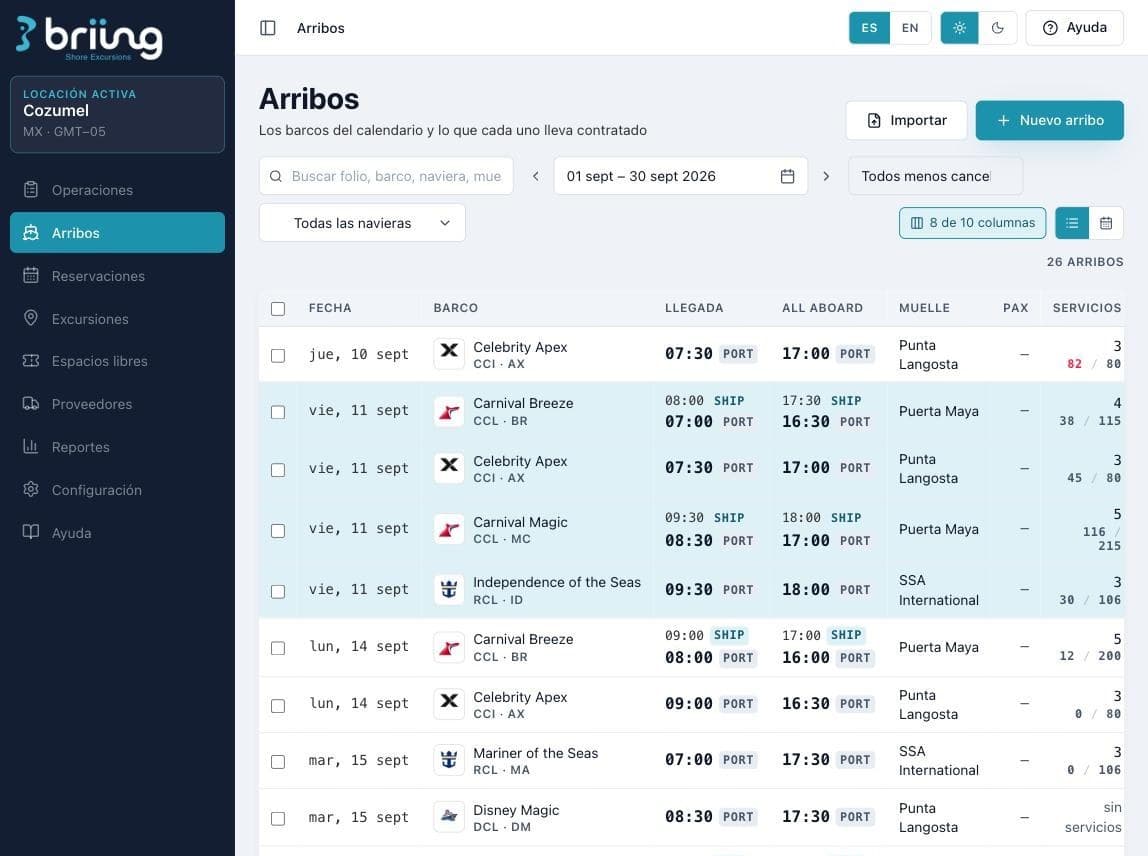
List of the month's ship arrivals with pier, arrival and all aboard

Shore excursion operations, from ship arrival to end of day.

Ship arrivals, services, capacity, sales counts, resources, manifests and reports. What today lives in one file per season and in the head of whoever runs the operation, in a single platform.

For the operator who gets the year's arrivals list, keys in the same offering fifty times, moves a tour an hour the night before and at seven in the morning still does not know for sure which boat is free.

The ship's clock is not the port's clock. The platform carries the offset marked on every arrival, because it was born on the pier and not across from it.

Shore excursion operators/Destination management companies and port concessionaires/Operations in more than one destination

Plan

A ship arrival on a date is the center of the platform. Everything else hangs off it.

A year of ship arrivals, loaded in one go

Cruise lines send their lists months ahead. Upload them with the platform template or key them in by hand, and the year's calendar is built.

  • Piers, cruise lines and ships as your own catalog, ready to reuse
  • Arrival and all aboard in ship time and in port time, with an editable offset
  • Every pier with its transfer minutes to the operation point
  • Arrivals start out scheduled or confirmed, however you decide
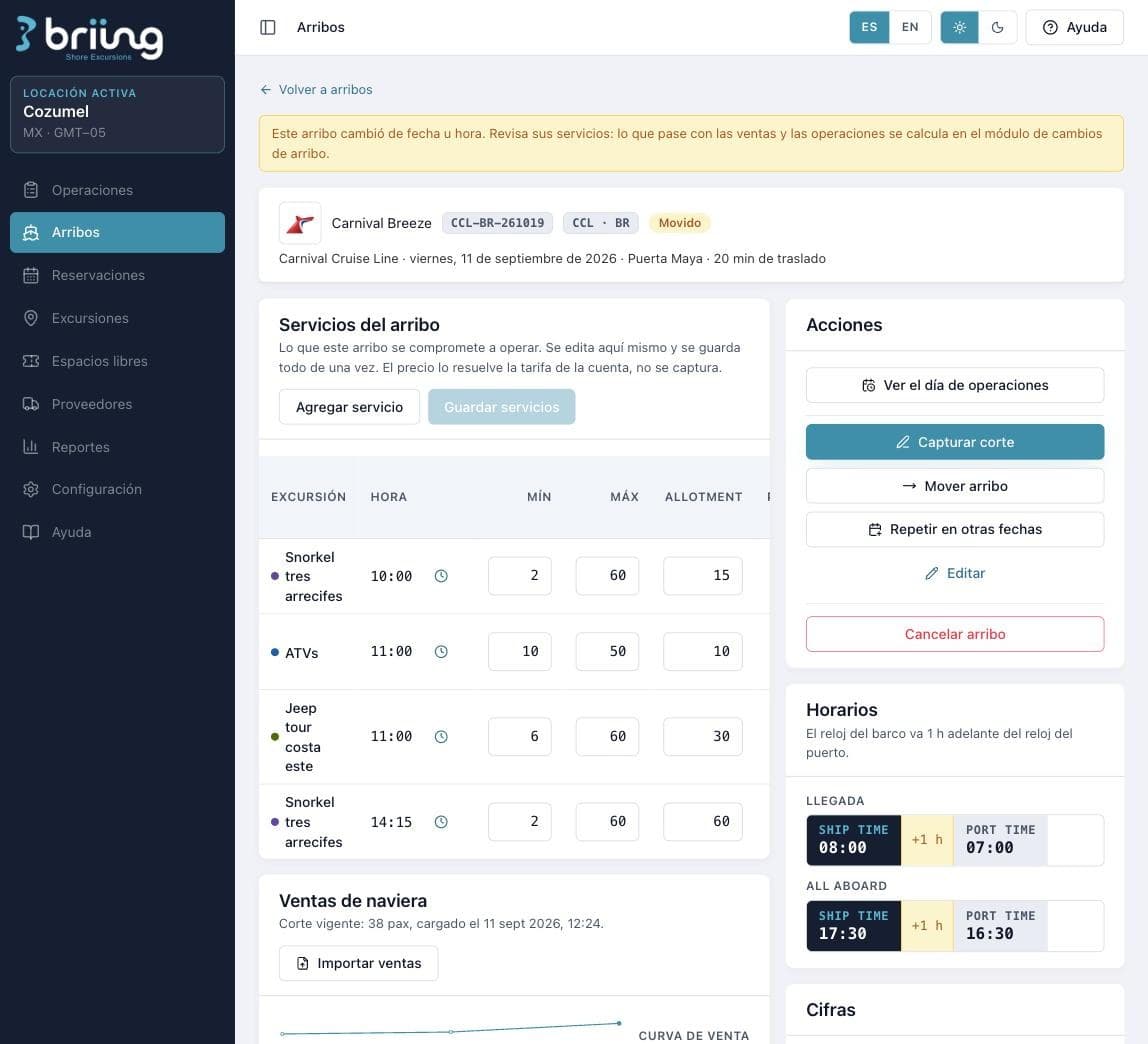
Detail of a ship arrival with its services, minimums, maximums and allotment
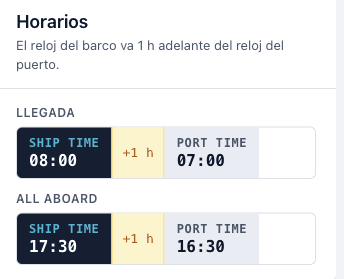
Ship time and port time, with the one hour offset

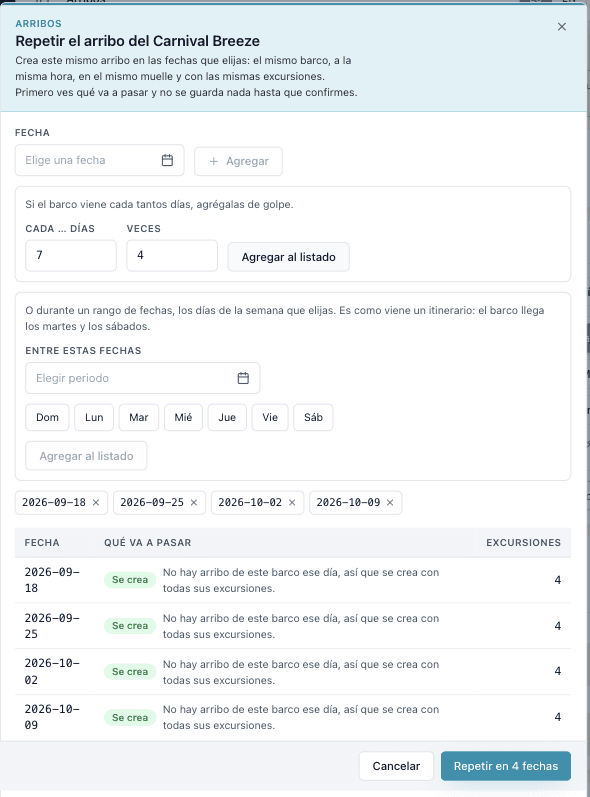
Repeat the arrival on the dates you pick

The same ship, at the same time, at the same pier and with the same excursions. If it comes every seven days you add it all at once, and if it arrives Tuesdays and Saturdays you add it by day of the week.

  • Every so many days, so many times, or a date range with the days you pick
  • You see what is going to happen first, and nothing is saved until you confirm
  • Everything you repeated stays editable afterward, arrival by arrival
Repeating an arrival on several dates, with a preview of what will be created

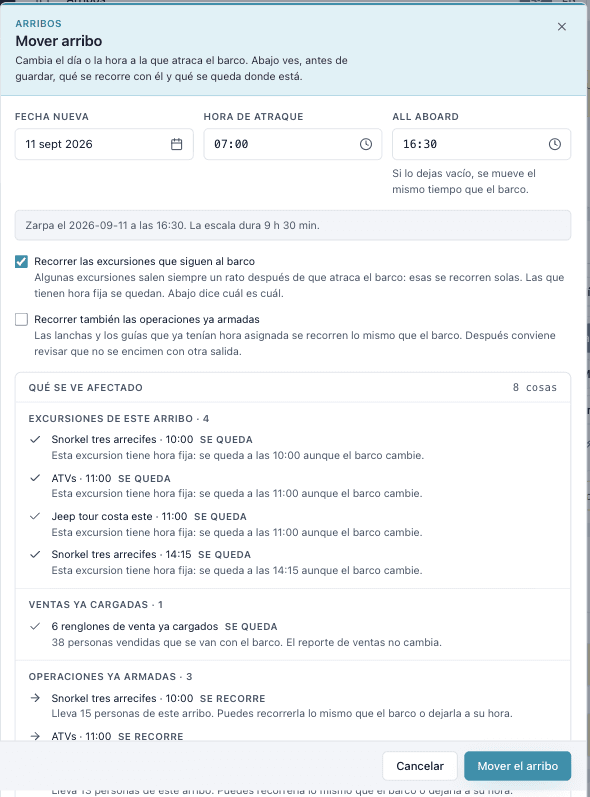
Move the arrival and see what breaks before you save

The ship changes day or time and the platform shows you, on the same screen, what moves with it, what stays at its own time and what already had people sold.

  • You decide whether the excursions follow the ship and whether the operations already built move too
  • Excursions with a fixed time stay put, and the platform tells you which one and why
  • Sales already loaded and resources already assigned show up in the list of what is affected
  • Nothing is applied until you confirm
Moving an arrival, with the detail of what gets affected

Operate

The operation changes the night before and sometimes the same morning. Here it gets sorted without crossed phone calls.

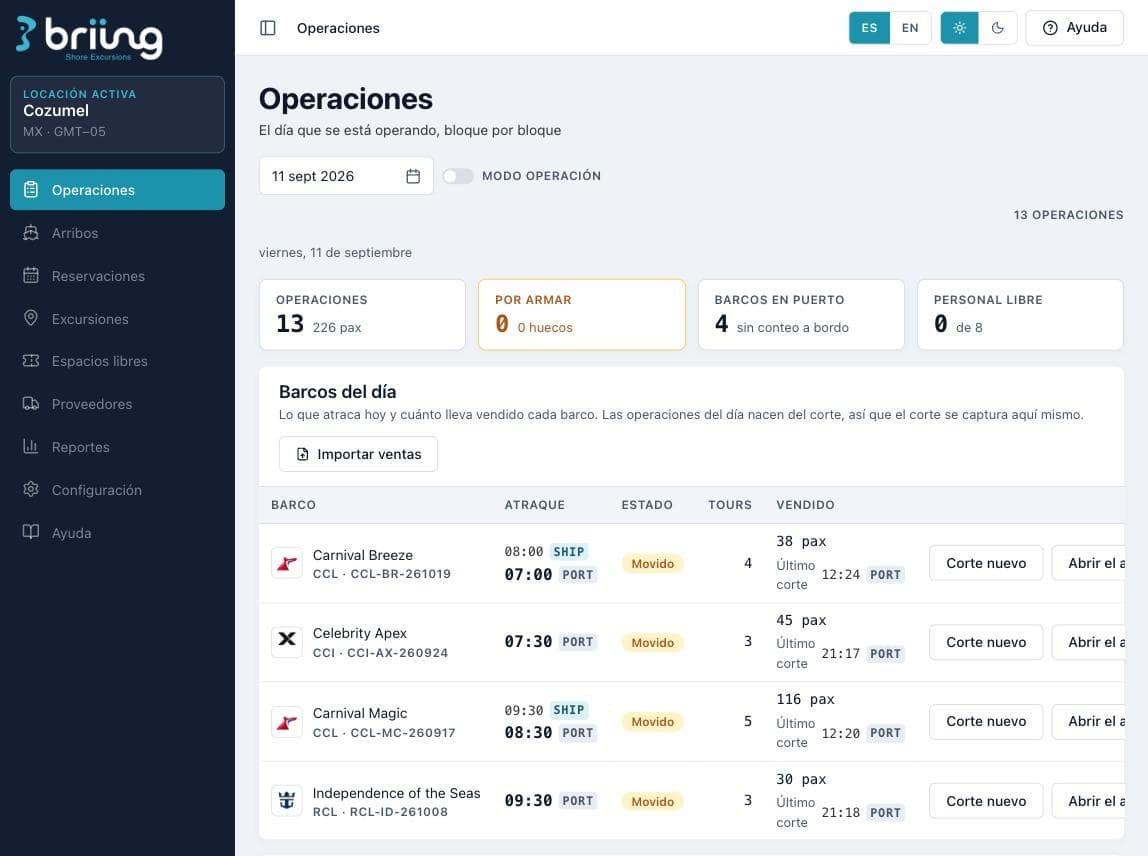
The day of operations, block by block

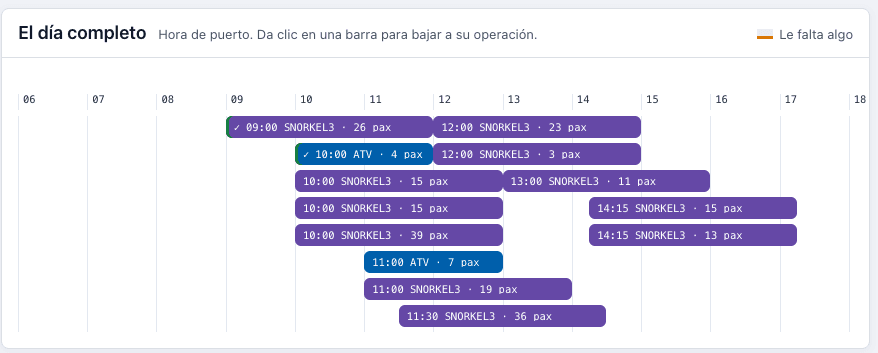
How many operations go out, how many are still to be built, which ships are in port and how much staff is free. The whole day on a timeline, in port time.

  • Built, to be built, with gaps or closed, visible at a glance
  • The platform spots when two operations at the same time fit together and proposes merging them
  • A person always approves the merge, and each excursion defines whether it accepts being merged
  • Operation mode for the screen that stays on at the pier
Day of operations with the ships in port and what each one sold
Timeline of the full day in port time

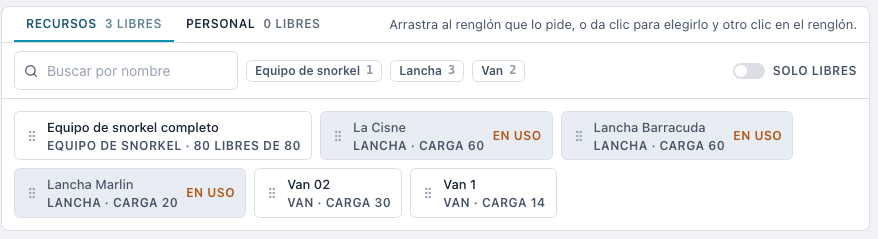
Resources and staff, without guessing what is free

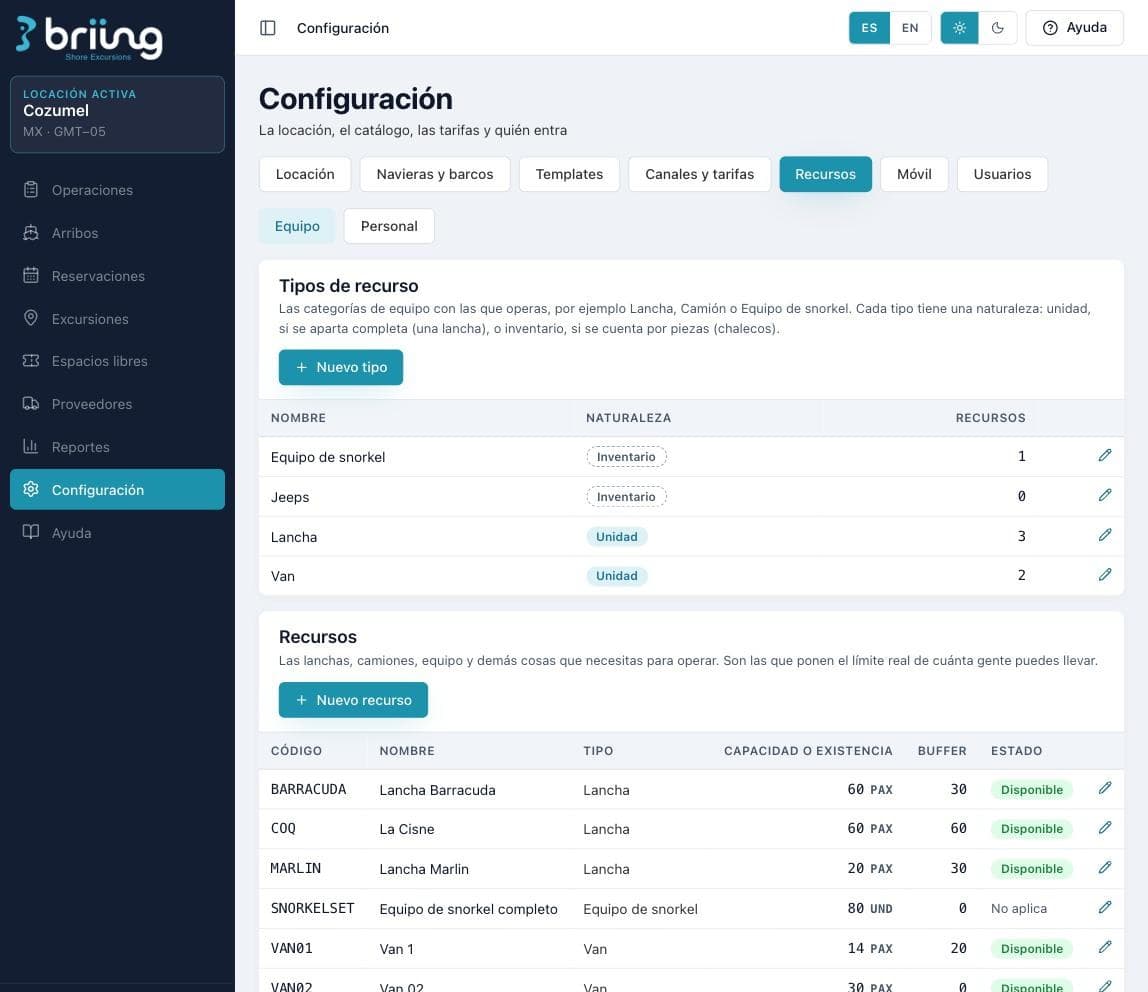
Boats, vans, jeeps and gear, each with its own nature. A boat is reserved whole. Snorkel gear is counted by piece. The platform knows the difference, and that is why it can tell you the real limit of people you can take.

  • Resources by unit or by inventory, with their capacity, their stock and their buffer
  • Guides, instructors and operators managed by location
  • When an operation is not built, it tells you what is missing and how many are available right now
  • Suppliers for what you do not operate yourself, with their charges and their settlement
Resource catalog with nature, capacity and buffer
Resources available to assign to the day of operations

The pier in your guide's pocket

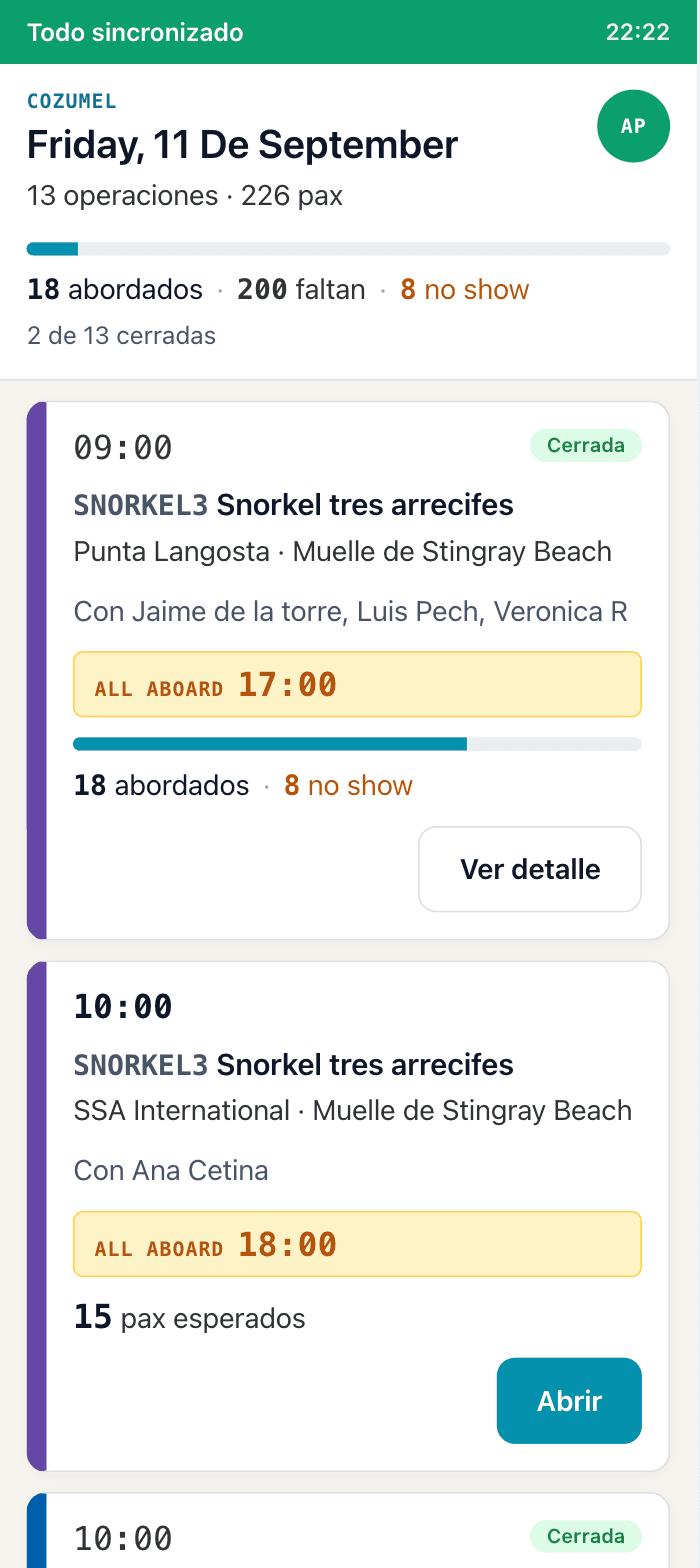
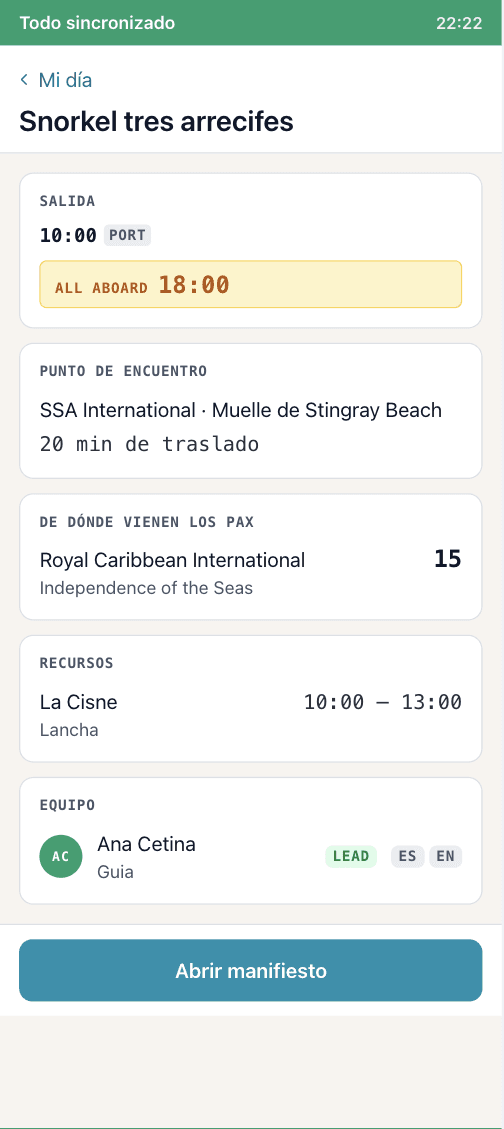
A field app that opens on any phone, with the same account and without downloading anything from any store. The guide sees their day, does check in and closes the operation from there.

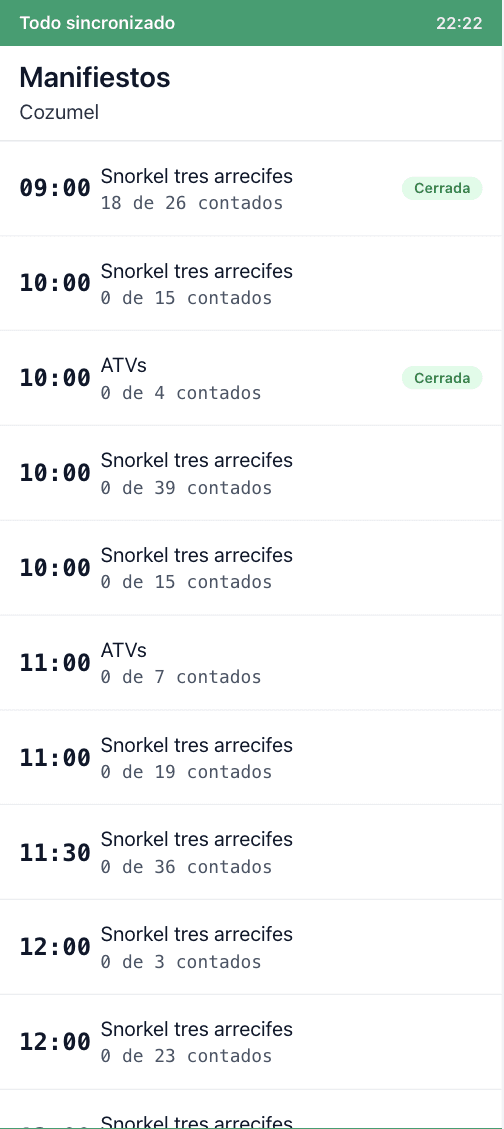
  • My day, the week and the manifests, with what each guide is assigned
  • Boarded, missing and no shows live by operation
  • Incidents flagged on the spot
  • The day does not close while any operation is still open, and the platform tells you which one
  • You define who can close, what the count starts at and whether the return pax is counted
  • It syncs when there is signal and holds when there is not
My day in the field app, with boarded and no shows
An operation with its meeting point, its resources and its team
The day's manifests with the count for each operation

Sell and report

Billing the cruise line happens weeks after the tour. The only thing holding it up is a number nobody can argue with.

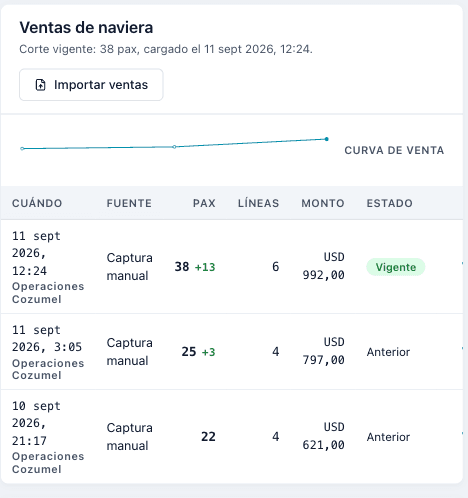
The cruise line sales counts, with their history

The cruise line reports how much it has sold and that count rules. Key it in or import it, and the departure's availability recalculates itself.

  • Current count and previous counts, with who loaded it and at what time
  • Sales curve for the arrival, to see whether the ship is going to fill or not
  • Sold, assigned and capacity for the departure on the same line
  • The price comes from the account's rate, it is never keyed in by hand
Cruise line sales counts with their curve and their history

The open spaces, and who to release them to

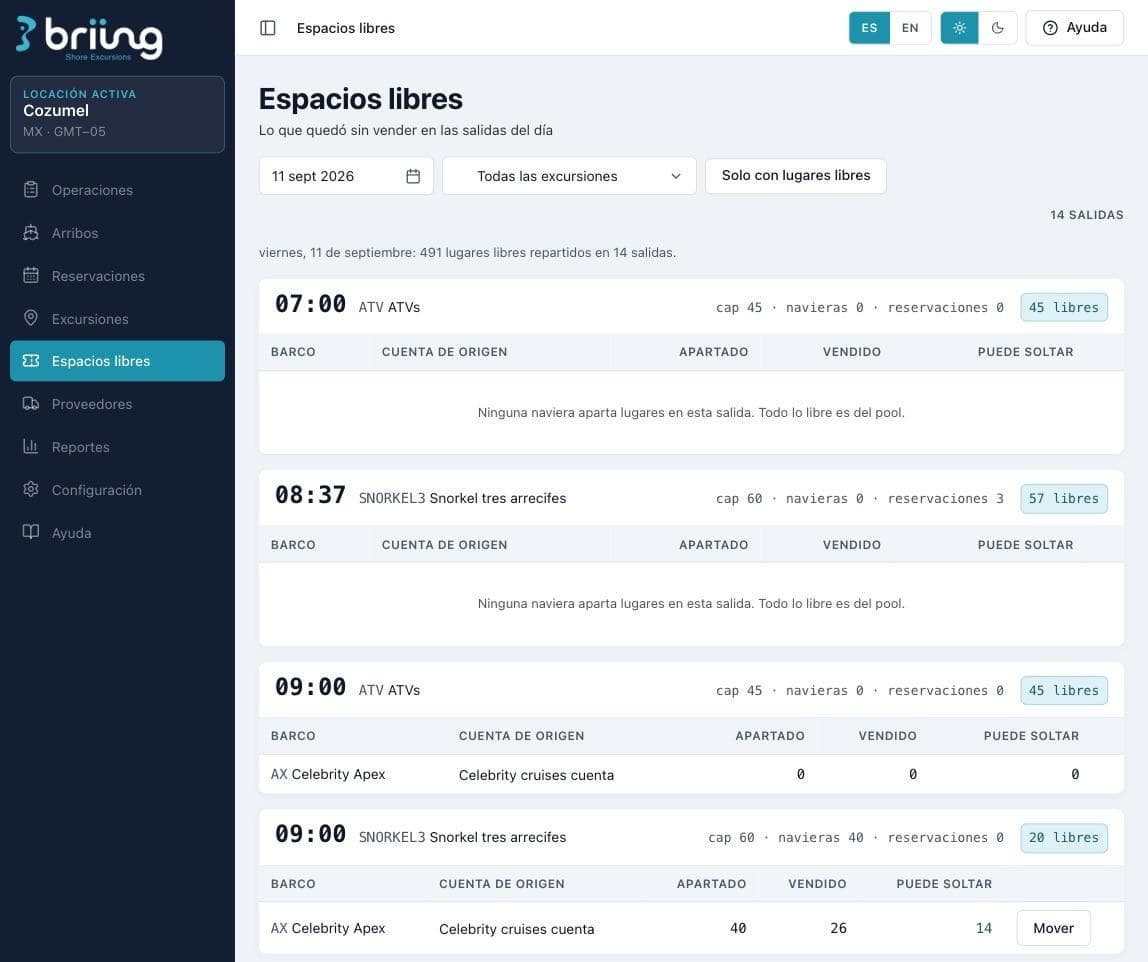
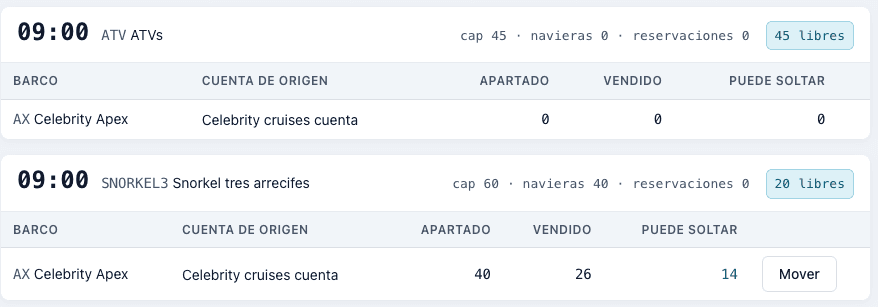
What the cruise line held and did not sell is still your capacity. The platform shows it to you departure by departure, tells you how much can be released and lets you move it.

  • How many open spots are left in the day and which departures they are in
  • Held and sold by ship and by source account
  • What can already be released, calculated against the latest count
  • Move the loose capacity to the pool to sell it through another channel
Open spaces for the day, departure by departure
Held, sold and what can be released on a departure

The eight documents of the operation

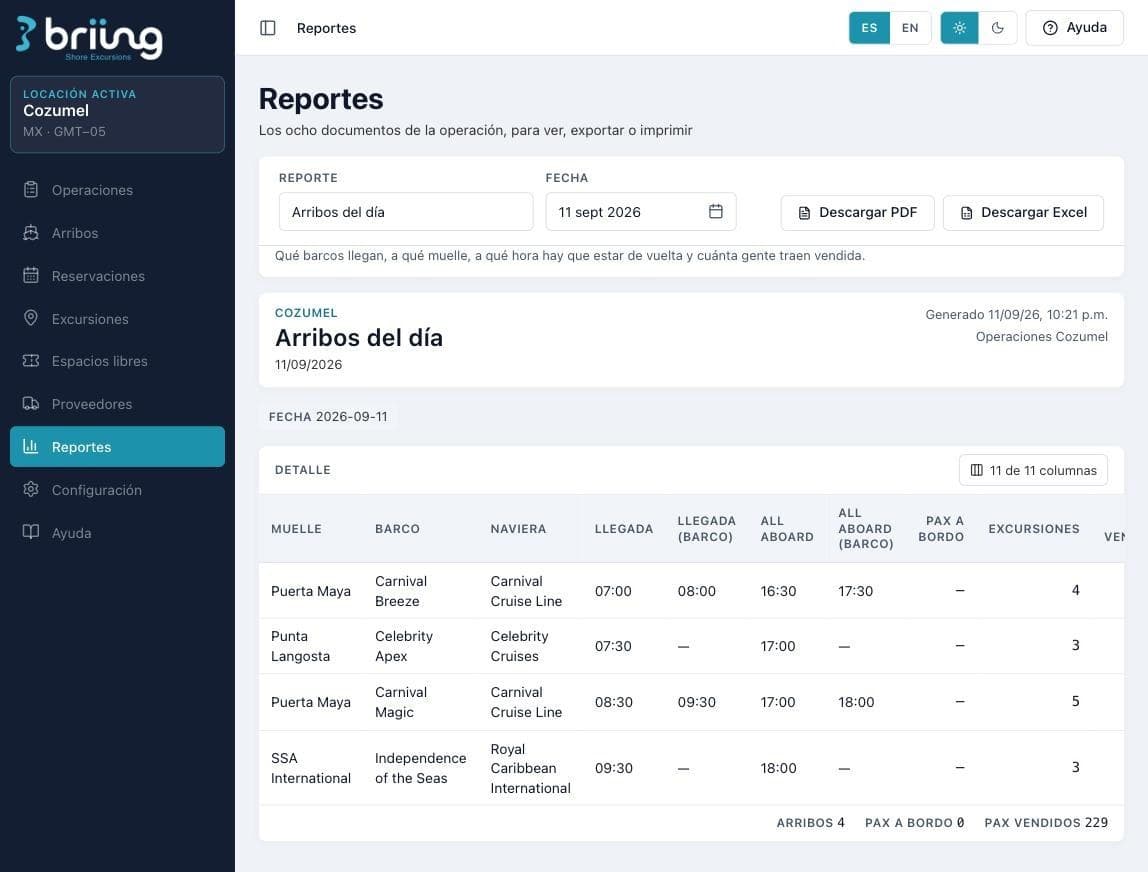
Arrivals of the day, detail by ship, resources of the day, end of day, financial and incidents. Each one with its date, its signature and the time it was generated, to view, export or print.

  • Arrivals of the day with pier, arrival and all aboard in both times
  • Columns you turn on and off depending on who the report is for
  • Download in PDF and in Excel
  • Sending by email and by WhatsApp to the recipients and groups you set up
Report of the day's arrivals, ready to export

Several ports, one platform, operations that never mix

Cozumel, Roatán, Cabo San Lucas, the Mexican Pacific or a port in Europe. Each destination operates as if the platform were its own.

  • Excursion catalog, resources and staff independent by location
  • Arrivals and operations that never cross between destinations
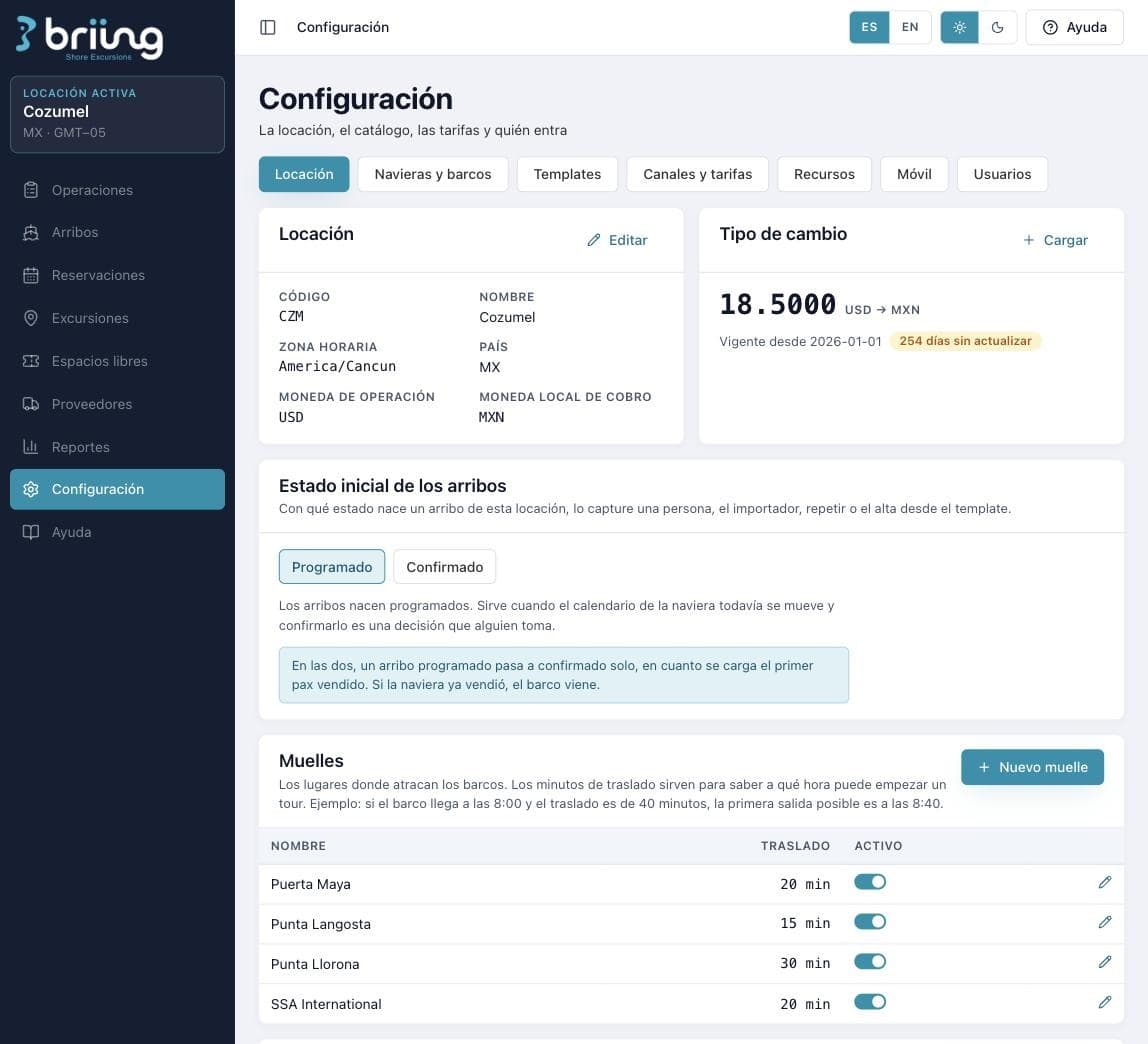
  • Operating currency and local billing currency, with their exchange rate and a warning when it is getting old
  • Cruise lines and ships as a global catalog, because the ship is the same in every port
  • Each user gets into the locations that belong to them, with the permissions for each one
Location settings: currencies, exchange rate and piers with their transfer

You pay by port, not by ship.

A monthly fee per location and a single licensing and onboarding charge. Onboarding is guided training: your team learns to load its arrivals and set up its rates, and the platform manual stays inside for when new people come in.

Book a demo
  • FeeMonthly per location
  • Licensing and onboardingA single charge at the start
  • CommitmentNo contract
  • TrainingGuided, with the manual inside
  • UpdatesIncluded

The Briing ecosystem

Briing ExperiencesBriing Shore ExcursionsBriing InsightsBriing Software Studio

Frequently asked questions

What people ask us before the call

What does Briing Shorex solve?

Shore excursion operations end to end: arrivals calendar with capacity by ship, net rates by cruise line, building the day of operations, resources and staff, manifests and settlement per call.

Does it account for the time difference on board?

Yes. Every arrival carries the difference between ship time and port time, because the platform was built on the pier.

Does it work for operating in several destinations?

Yes. Each location handles its own catalog, its resources and its currency, without mixing operations between destinations.

Tell us how your port operates.

Half an hour on a call and we show you the platform with your operation inside, with your ships and your excursions, not with demo data.

Book a demo Or download the PDF deck